
Optimizing a Query: A Guide for SEO & AI Teams
Your weekly SEO report is late again. The query that joins Search Console exports, CRM tags, and CMS metadata keeps hanging. At the same time, your AI visibility team is testing prompts to see whether ChatGPT, Gemini, or Perplexity mention the right brand, product, or category page, and the answers are inconsistent. One system is slow. The other is vague. Both problems come from the same root issue. You're asking a question that creates too much work, or not enough clarity, for the system answering it.
That's why optimizing a query matters far beyond the database team. For SEO and content teams, a good query is one that returns the right answer, in a useful shape, with as little wasted work as possible. In SQL, that means fewer rows scanned, fewer columns dragged through joins, and a plan the engine can execute efficiently. In AI, it means a prompt with enough structure and context that the model doesn't wander into irrelevant output or miss the entities you care about.
The useful mental shift is simple. Treat SQL queries and AI prompts as retrieval instructions. Both tell a system what to fetch, how to narrow scope, and what output format to produce. When teams adopt that shared discipline, they stop thinking of query tuning as a niche backend concern and start using it as an operating habit for analytics, content strategy, and AI search visibility.
Table of Contents
- The Unseen Cost of a Bad Query
- Start with a Well-Formed Question
- How to Diagnose a Performance Bottleneck
- Core Techniques for Faster Queries
- Advanced Strategies Beyond Basic Syntax
- Measuring Success and Proving Value
- Building a Culture of Performance
The Unseen Cost of a Bad Query
A bad query rarely looks dramatic. It looks ordinary. A dashboard spins longer than expected. A report pulls duplicate rows. An AI prompt returns a polished answer that still ignores the brand comparison you needed.
For SEO teams, the cost shows up as delayed decisions. If your content cluster report arrives after the editorial meeting, it's less useful no matter how accurate it is. For AI visibility work, the cost shows up as false confidence. You may think a model “doesn't cite us” when the underlying issue is that your prompt asked for broad commentary instead of a constrained comparison, citation summary, or brand mention check.
A good query isn't just fast. It's clear, selective, and aligned to the task. If the task is to compare organic landing pages for one content cluster, the query should say that directly. If the task is to assess how an AI model talks about your brand in category-level prompts, the prompt should define the category, the brands, the response format, and the exclusions.
Practical rule: Optimize for correctness first, then for cost.
That principle holds across databases and AI systems. A sloppy SQL query can waste compute on unnecessary scans. A sloppy prompt can waste tokens on generic exposition. In both cases, the answer arrives slower and with more cleanup required downstream.
The teams that get this right don't separate “data work” from “AI work.” They use the same discipline in both places. Define the question. Reduce ambiguity. Remove unnecessary work. Then inspect the system's behavior before making changes.
Start with a Well-Formed Question
The fastest way to improve performance is often to stop asking vague questions. Teams usually reach for tuning after they've already written a messy query or prompt. That's backward. Most of the waste starts at formulation.
What clarity looks like in SQL
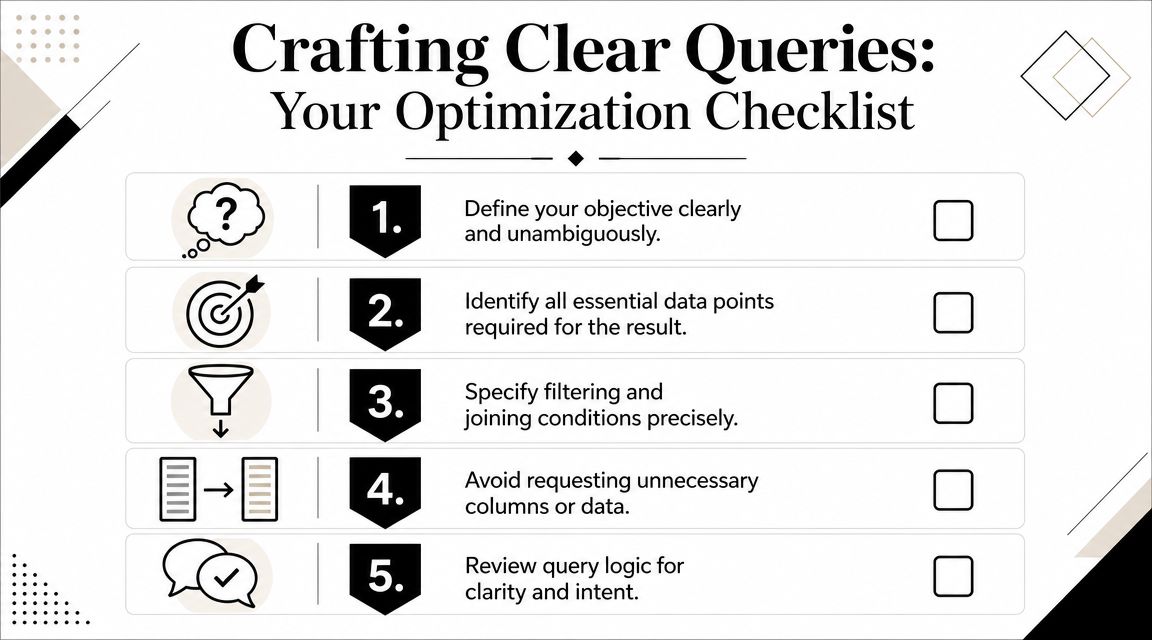
SQL gets slow and fragile when it asks for more than the task needs. The classic example is SELECT *. It feels convenient, but it tells the engine and your downstream workflow to carry every available column, whether you need them or not.
If an SEO analyst wants organic sessions, landing page, publish date, and content cluster for a single quarter, that request should look like this in spirit:
- Specify only needed columns
- Filter to the date range early
- Join only the dimension tables required for the answer
- Use readable aliases
- Return a result set designed for the next step, not for curiosity
A rough example:
SELECT
  gsc.landing_page,
  gsc.organic_clicks,
  cms.publish_date,
  cms.content_cluster
FROM gsc_pages gsc
JOIN cms_pages cms
  ON gsc.url = cms.url
WHERE gsc.report_date >= '2025-01-01'
  AND gsc.report_date < '2025-04-01'
  AND cms.content_cluster = 'technical-seo';
That query is easier to optimize because its intent is visible. You can inspect the join, the filters, and the projected columns quickly. The same mindset also improves collaboration. Analysts, engineers, and SEO managers can all see what the query is trying to answer.
If you're refining how you define search topics before they ever reach SQL, Netco Design's keyword strategy is a useful reference because it forces clearer scope around topic clusters, intent, and priority terms.
What clarity looks like in AI prompts
AI prompts fail for many of the same reasons SQL queries fail. They're too broad, they request too much output, or they leave key constraints unstated.
A weak prompt:
- Analyze our competitors and tell me how we compare in AI search.
A stronger prompt:
- Act as an SEO analyst. Compare brand mentions for Brand A, Brand B, and Brand C across category-level buying-intent prompts for enterprise CRM software. Return a markdown table with columns for brand named, context of mention, whether a citation appears, and notable omissions. Exclude social commentary and focus on product-selection intent.
That second version does several things well:
- Assigns a role so the model knows the lens.
- Defines the comparison set instead of leaving “competitors” open-ended.
- Constrains the prompt type to category-level buying intent.
- Specifies the output format so the answer is easier to audit.
- Adds exclusions to reduce irrelevant text.
Good prompt engineering is often just query optimization with natural language instead of SQL syntax.
For content teams, one of the most useful habits is to draft prompts and SQL side by side. If your prompt asks for “brand visibility by topic,” your SQL should already reflect what “brand,” “visibility,” and “topic” mean in your reporting model. That keeps both systems aligned and makes debugging much easier later.
How to Diagnose a Performance Bottleneck
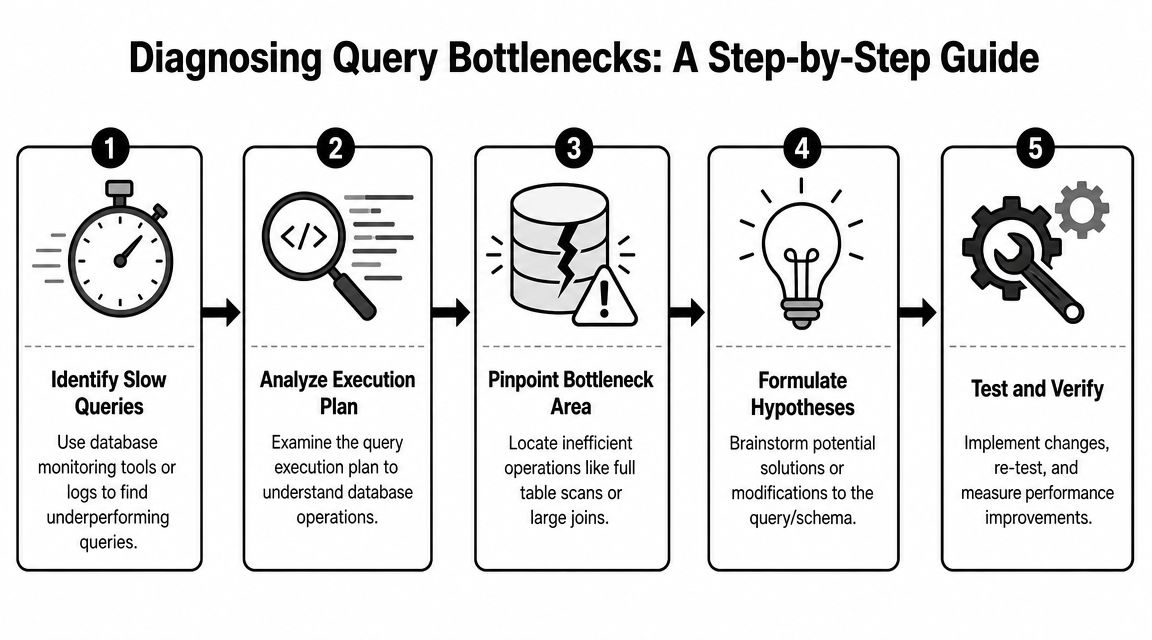
When a query turns slow, teams often change syntax immediately. They add an index request, rewrite a join, or split the query into pieces before they've identified where the actual cost sits. That's how tuning turns into superstition.
Read the plan before changing the query
A practical workflow starts with the execution plan, then moves to early filtering, then reducing row and column width before joins. Snowflake's guidance emphasizes inspecting plans for full scans, large shuffles, or expensive joins before production deployment, along with tactics like using WHERE instead of HAVING, avoiding SELECT *, and joining smaller tables first in the logical design of the query, as described in Snowflake's query optimization overview.
In plain terms, the plan tells you how the engine intends to do the work. You're looking for signs that the engine is reading much more data than expected or combining tables in an expensive way.
Common red flags include:
- Full scans on large tables when the query should be selective
- Expensive join operations on wide intermediate results
- Large movement of data between processing stages
- Late filters that allow too many rows into the join step
- Aggregations after unnecessary expansion of the row set
A second issue is less visible but often decisive. Modern database engines use a cost-based optimizer that selects an execution plan based on statistics about tables and indexes. Oracle explicitly notes that collecting statistics on base tables improves query performance and that these statistics cover the table's columns and associated indexes, while IBM and Snowflake make the same broader point about optimizers relying on current statistics to estimate cost accurately in Oracle's documentation on optimizing queries with statistics.
That matters because a query can be logically fine and still degrade after data changes. If statistics are stale, the optimizer can misjudge row counts and choose a plan that scans far more data than necessary.
A query that suddenly becomes slow often didn't “break.” The optimizer lost sight of the data distribution it was planning against.
Use a parallel diagnostic loop for AI
AI prompt diagnosis follows the same pattern, even though the tools differ. Don't rewrite everything at once. Strip the prompt down and identify which instruction adds confusion, delay, or off-target output.
A practical loop looks like this:
| Check | Database query | AI prompt |
|---|---|---|
| Scope | Are too many tables or dates included? | Are too many tasks packed into one prompt? |
| Selectivity | Are filters applied early? | Are constraints and exclusions explicit? |
| Output width | Are unused columns returned? | Is the model asked for too much prose? |
| Planner behavior | Does the execution plan show scans or costly joins? | Do repeated tests show the model ignoring one instruction? |
For AI workflows, isolate variables one at a time:
- Remove extra tasks such as “analyze, summarize, recommend, and rewrite”
- Reduce output format complexity
- Fix the comparison set
- Test whether brand names, product names, or query classes are too ambiguous
- Review logs or saved runs to see whether the same prompt shape fails consistently
One undercovered reality is that generic advice doesn't explain every bad plan. Engine-specific behavior can matter. SQL Server practitioners have pointed out that some subquery plans become suboptimal in ways that generic indexing advice won't fix, and that changing query shape can matter more than adding another broad tuning tip, as discussed in Erik Darling's analysis of subquery plans in SQL Server.
That has a clear AI parallel. Sometimes the prompt isn't wrong in content. It's wrong in shape. The model may respond better to a two-step sequence than one overloaded instruction. Diagnosis starts by observing actual behavior, not by applying canned fixes.
Core Techniques for Faster Queries
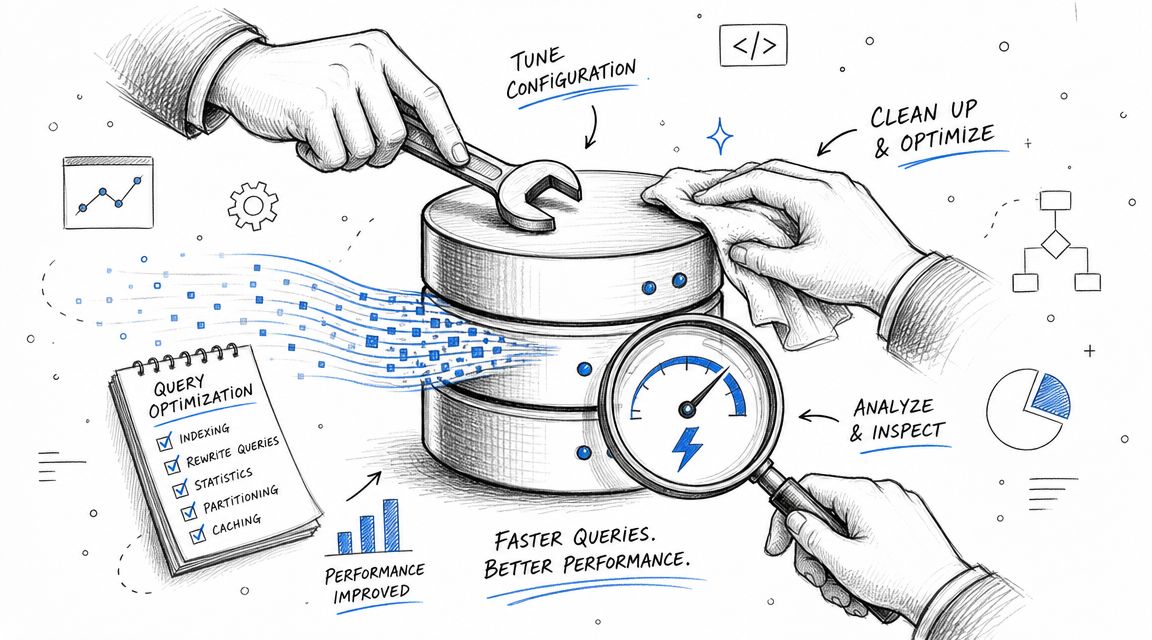
The most durable rules in query tuning haven't changed much because the main costs haven't changed much either. Filter early, project less, and join efficiently remain the foundation across platforms because they directly reduce the work involved in reading and processing data, as summarized in Dremio's SQL query optimization guidance.
Filter early and narrow the workload
If your SEO warehouse stores page performance, keyword mappings, and editorial metadata, the cheapest row is the row you never read.
A weaker pattern:
SELECT
  p.*,
  k.*,
  c.*
FROM page_metrics p
JOIN keyword_map k ON p.url = k.url
JOIN content_meta c ON p.url = c.url
HAVING c.content_type = 'blog';
A better pattern pushes the filter into WHERE and narrows the candidate set before the heavy join work expands:
SELECT
  p.url,
  p.organic_clicks,
  c.content_cluster
FROM page_metrics p
JOIN content_meta c ON p.url = c.url
WHERE c.content_type = 'blog';
In AI prompt terms, filtering early means adding negative constraints and scope limits up front. If you want brand mention analysis for commercial-intent prompts, say that immediately. Don't ask for “all visibility patterns” and hope the model infers the commercial angle.
Useful translations from SQL to prompts:
- SQL
WHEREclause becomes prompt constraints - Date filter becomes timeframe or scenario boundary
- Entity filter becomes explicit brand or topic inclusion list
Project less and control output shape
Projection is one of the easiest wins because teams often over-request data out of habit. They pull every column “just in case,” then sort out relevance later in Python, Sheets, or BI.
That's expensive in databases and messy in AI. In SQL, unnecessary columns increase row width and can make joins, sorts, and memory use heavier. In AI, unnecessary output requirements encourage the model to produce filler.
Field note: If you can't explain why a column or output section is needed before running the query, remove it.
For AI prompts, projection control means specifying the result shape tightly:
- Use markdown tables when you need comparability
- Ask for bullets when you need scanning
- Request short evidence-backed observations, not essays
- Set boundaries such as “return only categories, cited sources, and missed entities”
For SEO analysts doing entity and citation review, tooling is helpful. If you need visibility into the search queries models branch into before citing sources, the Spotlight Query Fan-Out extension is useful because it reveals the fan-out queries used in AI search workflows. That gives content teams a concrete way to compare what they think they're asking with what the system is retrieving.
If your team is also sharpening topic selection upstream, effective keyword analysis methods can help clarify which terms belong in the retrieval layer versus the reporting layer.
Join efficiently and question the request pattern
Joins create value, but they also create risk. The common advice is solid. Use indexes on columns involved in WHERE, JOIN, and ORDER BY clauses. Prefer smaller or indexed joins. Remove unnecessary joins. Break complex logic into CTEs when that reduces work. The nuance is that not every slow query is rescued by another index or cleaner syntax.
A useful habit for SEO data work is to ask whether the join belongs in the same query at all. If you're joining raw GSC page rows, keyword mappings, CMS metadata, author info, and internal linking data just to produce a weekly editor summary, you may be building a monolith where a staged workflow would be simpler and more reliable.
Consider this decision frame:
- Keep it in one query when the logic is clear and the result is consumed once
- Stage it into steps when intermediate datasets are reusable or significantly smaller
- Precompute common shapes when the same expensive combination gets queried repeatedly
There's also an application-level challenge people miss. Some workloads create avoidable cost before the database even sees the SQL. If the app forces wildcard search across a broad dataset or triggers repeated N+1-style lookups, the database inherits unnecessary work. In those cases, “optimizing a query” starts with redesigning the request pattern, not shaving syntax.
For AI, the equivalent is a prompt chain that repeatedly asks for the same retrieval context in slightly different wording. If you can cache the context, separate retrieval from synthesis, or reduce repeated lookups, you cut cost and improve consistency at the same time.
Advanced Strategies Beyond Basic Syntax
Basic tuning gets you far, but the next layer of gains usually comes from architecture and experimentation rather than clever SQL alone.
When the application is the real bottleneck
One of the most overlooked optimization moves is to stop tuning the query and change the request pattern instead. SQL Server guidance makes this point clearly when discussing wildcard searches and related techniques. If the application insists on broad string matching or repeated lookups, it can create unavoidable work that no amount of SQL polishing will fully remove, as outlined in SQLShack's query optimization techniques.
That lesson applies directly to AI search workflows. Many teams ask a model to do retrieval, comparison, narrative synthesis, sentiment framing, citation extraction, and recommendation generation in one pass. The prompt isn't just long. The task graph is badly designed.
Here are common situations where changing the pattern beats tweaking syntax:
Repeated lookups
If your application asks for page-level metrics one URL at a time, consolidate requests upstream.Monolithic prompts
Split retrieval from evaluation when the model keeps mixing evidence gathering with opinion.Wildcard or fuzzy search by default
Narrow the candidate set first, then apply fuzzy logic only where needed.Heavy joins for recurring reports
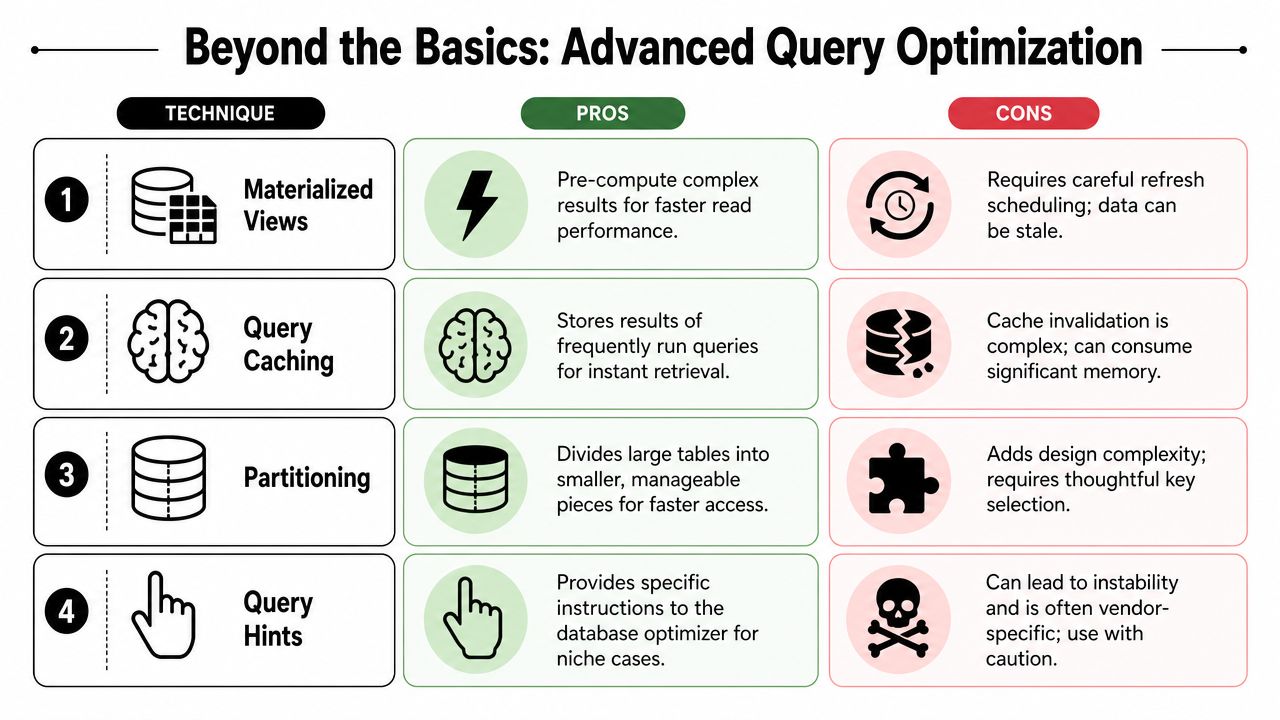
Consider materialized views, temporary tables, or cached intermediate tables when the same combination is requested repeatedly.
A query that's fast on one engine may still be slow on another. Join choice, row goals, and optimizer behavior differ. Hints can help in edge cases, but they come with maintenance risk and lock you into vendor-specific behavior. Use them carefully, and only after you've confirmed the planner keeps making a bad choice for a stable workload.
Sometimes the right optimization is to stop asking one giant question and start asking two precise ones.
For teams adapting SEO workflows to AI search, SEO for generative AI search is a useful companion read because it pushes the conversation beyond classic rankings into how models retrieve, summarize, and cite information.
How to test advanced changes without guessing
Advanced optimization needs proof, not folklore. If you're comparing a materialized view against a base-table query, or a single-prompt workflow against a two-step AI chain, define the test before you implement the fix.
Use a simple evaluation setup:
- Hold the business question constant
- Change one design variable at a time
- Run the same workload repeatedly
- Record the behavior in a shared log
- Review trade-offs beyond speed, including freshness, maintenance burden, and result quality
A compact scorecard helps:
| Change tested | What improved | What got harder |
|---|---|---|
| Materialized view | Faster recurring reads | Refresh management |
| Query cache | Faster repeated access | Invalidation logic |
| Query hint | Better plan in niche case | Portability and stability |
| Two-step prompt flow | Cleaner outputs | More orchestration overhead |
This is also where stakeholder trust is won. When a content lead asks why engineering is spending time on “query refactors,” the answer should be grounded in workflow outcomes. Faster reports, cleaner joins between content and performance data, and more stable AI evaluation runs are much easier to defend than abstract claims about elegance.
Measuring Success and Proving Value
Optimization work only matters if someone can tell the difference without reading the SQL.
Measure the system, not just the syntax
For databases, compare the old and new versions of the same query under the same business question. Track practical indicators such as runtime, data scanned, shuffle behavior, full scans observed in the plan, and whether the result set shape is easier for downstream analysis.
For AI prompts, compare prompt versions against a fixed evaluation set. Measure whether the output is more relevant, more constrained, easier to parse, and more faithful to the task. If you're monitoring AI search visibility, define what counts as a useful result before testing. Brand mention presence, citation capture, prompt class coverage, and consistency across repeated runs are all more useful than a vague “better answer” label.
A clean reporting habit is to keep one worksheet or dashboard with three layers:
- Technical metric such as latency or plan quality
- Workflow metric such as report turnaround or analyst review time
- Business metric such as campaign decisions made faster or AI visibility checks completed reliably
If your team is evaluating AI search demand, prompt volume in AI search is worth understanding because it helps separate prompt frequency from anecdotal prompt examples.
Tie speed improvements to business outcomes
The strongest optimization stories don't end with “the query runs faster now.” They end with a business change.
Examples include:
- Editorial teams get a weekly cluster report in time for planning
- Analysts spend less time cleaning unnecessary output
- AI visibility reviews become repeatable instead of ad hoc
- Brand and content teams can compare model mentions using the same structure each cycle
This is why optimization should be treated as an ongoing discipline. Data changes. Content inventories grow. AI systems shift in how they retrieve and summarize. A query or prompt that worked last quarter can drift out of fit even when nobody touched the syntax.
The teams that keep performance high don't rely on one heroic cleanup. They build a review loop. They inspect plans. They simplify prompts. They remove unnecessary joins and unnecessary instructions. They test changes against real tasks, then keep what holds up in production.
Building a Culture of Performance
Teams get better at optimizing a query when they stop treating it as a rescue move. It needs to be part of how analysts write SQL, how content teams frame research requests, and how AI visibility programs evaluate prompts.
That culture starts with a simple standard. Every question should be clear, scoped, and cheap enough to answer responsibly. In practice, that means better query formulation, regular inspection of real system behavior, and a willingness to redesign the request pattern when syntax changes aren't enough. For teams adapting SEO workflows to newer systems, using AI in search engine optimization is part of the same operational shift.
Spotlight Group LLC helps teams monitor how brands appear across AI search and conversations, including which prompts surface them, which sources models cite, and how visibility changes over time. If your team is trying to connect classic query discipline with AI search performance, Spotlight Group LLC is one option to evaluate alongside your existing analytics and content workflow.

Michael Hermon
Before Spotlight, Michael led Innovation and AI at monday.com after exiting his previous startup. He learned to code at 13 at MIT and later attended Columbia’s MBA program.
https://linkedin.com/in/michaelhermon