
H1 Tag SEO: A Complete Guide for Search in 2026
The most repeated advice about H1 tags is also the least useful: “Use one H1 with your exact keyword and you're optimized.”
That's outdated. A good H1 still matters, but not because it acts like a ranking cheat code. It matters because it tells people, crawlers, screen readers, and now AI systems what the page is about. In practice, H1 tag SEO has shifted from tactical keyword placement to clear semantic labeling.
That shift changes how content teams should work. If your H1 is vague, stuffed, or disconnected from the rest of the page, you make the page harder to interpret. If it's clear, aligned with the title tag, and supported by a clean heading hierarchy, you give both search engines and AI summarization systems a better shot at understanding the page correctly.
Table of Contents
- Why Your H1 Tag Matters More Than You Think
- Understanding the H1's Semantic Role
- The Evolution of H1 Tags in SEO
- How to Write an Optimized H1 Tag in 2026
- Common H1 Tag Mistakes and How to Fix Them
- H1 Tags and the Future of AI Search
- Frequently Asked Questions About H1 Tags
Why Your H1 Tag Matters More Than You Think
The old myth says the H1 is a major ranking lever on its own. The evidence no longer supports that framing.
What still holds true is that the H1 is one of the clearest ways to define a page's topic. It's not a strict requirement for ranking by itself, but it remains one of the strongest page-level signals for what the document is about when it's used well. That matters for SEO, accessibility, and AI-driven summarization.
A lot of teams still overinvest in the wrong part of H1 optimization. They debate exact-match phrasing, force awkward wording, and treat the heading like a place to stuff search terms. That usually weakens the page. A robotic H1 doesn't help readers trust the content, and it doesn't improve the broader structure that modern systems use to interpret meaning.
The real job of the H1
A strong H1 does three jobs at once:
- Sets topic expectation: It tells a visitor what they're about to read.
- Supports structure: It anchors the hierarchy that H2s and H3s build underneath.
- Improves machine interpretation: It gives crawlers and AI systems a high-confidence label for the page's main subject.
Practical rule: Treat the H1 as the page's top-level topic statement, not as a keyword container.
H1 tag SEO becomes more important in 2026, not less. Traditional ranking impact may be less rigid than people think, but semantic clarity matters more because content now needs to be understood not only for indexing, but for extraction, summarization, and citation.
What works and what doesn't
What works is simple: write a heading that clearly names the page topic in natural language and matches the rest of the content.
What doesn't work is writing something like “Best H1 Tag SEO Keyword Strategy for H1 Tag SEO Success” and expecting that repetition to send a stronger signal. That style belonged to an older search era. Today, the better move is clarity, consistency, and usable structure.
Understanding the H1's Semantic Role
An H1 is the main heading of the document. That sounds basic, but the important part is semantic, not visual. An H1 isn't just bigger text. It's a structural signal that tells systems, “this is the main topic of the page.”

Think of the H1 as the book title
The easiest way to explain it to a content team is with a book analogy.
The H1 is the book's title. Your H2s are the main chapters. Your H3s are the sub-sections inside those chapters. If the book title is unclear, every chapter underneath it becomes harder to interpret. The same thing happens on a webpage.
That structure matters to more than Googlebot. Screen readers rely on heading markup to help people move through content quickly. A clean heading hierarchy lets someone jump to the section they need instead of listening to the entire page line by line. When teams use headings only for styling, they break that experience.
According to Moz's guide to H1 tags, Google and other search engines use the H1 as a strong page-level signal for the document's main topic, but it isn't a strict ranking requirement. Pages can still rank with multiple H1s or even no H1s if the content satisfies intent and is well structured.
Why semantics matter in practice
That flexibility is where people get confused. They hear “Google can rank pages without an H1” and conclude that H1s don't matter. That's the wrong takeaway.
An H1 still reduces ambiguity. It helps a crawler classify the page faster. It helps a reader confirm they landed in the right place. It helps assistive technologies present the page properly. And in AI search environments, it gives models a clean opening signal about the document's central topic.
Here's what a semantic H1 does well:
- Names the topic directly: “H1 Tag SEO Guide for 2026” is clearer than “Everything You Need to Know.”
- Matches user intent: The heading should reflect what the page answers.
- Supports hierarchy: The sections below should logically expand the promise of the H1.
A poor H1 usually fails in one of two ways. It's either too generic to be useful, or it's overloaded with keywords in a way no person would naturally write.
A heading can be technically valid and still be strategically weak.
That's the distinction teams need to understand. Semantic usefulness is the standard now.
The Evolution of H1 Tags in SEO
H1 guidance only makes sense if you understand the history. A lot of bad advice survives because it was once directionally right in a very different search environment.
What changed from old SEO to modern SEO
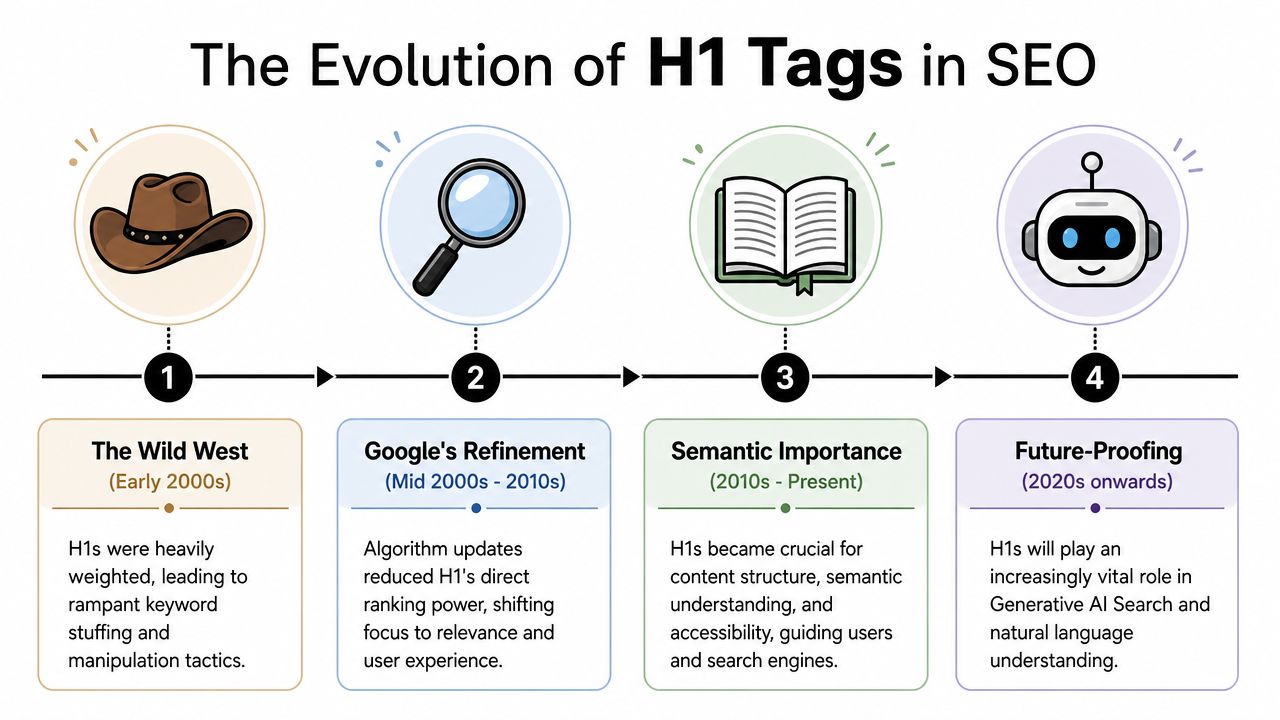
In the early era of SEO, teams treated the H1 as a high-value ranking element. That led to predictable abuse. Marketers stuffed exact-match keywords into H1s, repeated phrases unnaturally, and often wrote headings for algorithms instead of people.
Google's evolution changed that.
As documented in Moz's H1 experiment and discussion of Google guidance, John Mueller said in 2019 that a site can rank well with no H1 tags or with five H1 tags, and that multiple H1s are normal in HTML5. The same Moz analysis also reported no statistically significant ranking difference between pages using H1s and H2s for titles. That was a major correction to the old one-H1-or-fail mindset.
The takeaway isn't that structure stopped mattering. It's that strict H1 formulas lost direct ranking importance as search systems became better at understanding context, semantics, and intent across the full page.
The H1 used to be treated like a shortcut. Now it works more like a label in a larger system of meaning.
That larger system includes body copy, internal linking, title tags, schema, layout, supporting headings, and the overall coherence of the document. Teams that still optimize H1s in isolation are solving the wrong problem.
What that means for teams today
The modern best practice is more flexible, but also less forgiving of sloppy writing. You don't need to obsess over rigid old-school rules. You do need a heading that makes sense for humans and fits the rest of the page.
For technical teams working across templates, CMS limitations often create the actual H1 problems. Theme output, component libraries, and page-builder defaults can all introduce structural noise. If you're thinking about AI search readiness, this broader foundation matters as much as the headline itself. A useful companion read is this guide to technical foundations for ranking on AI search.
The shift is simple. Old SEO asked, “Did we place the keyword in the H1?” Modern SEO asks, “Is the page easy to understand at a glance?”
How to Write an Optimized H1 Tag in 2026
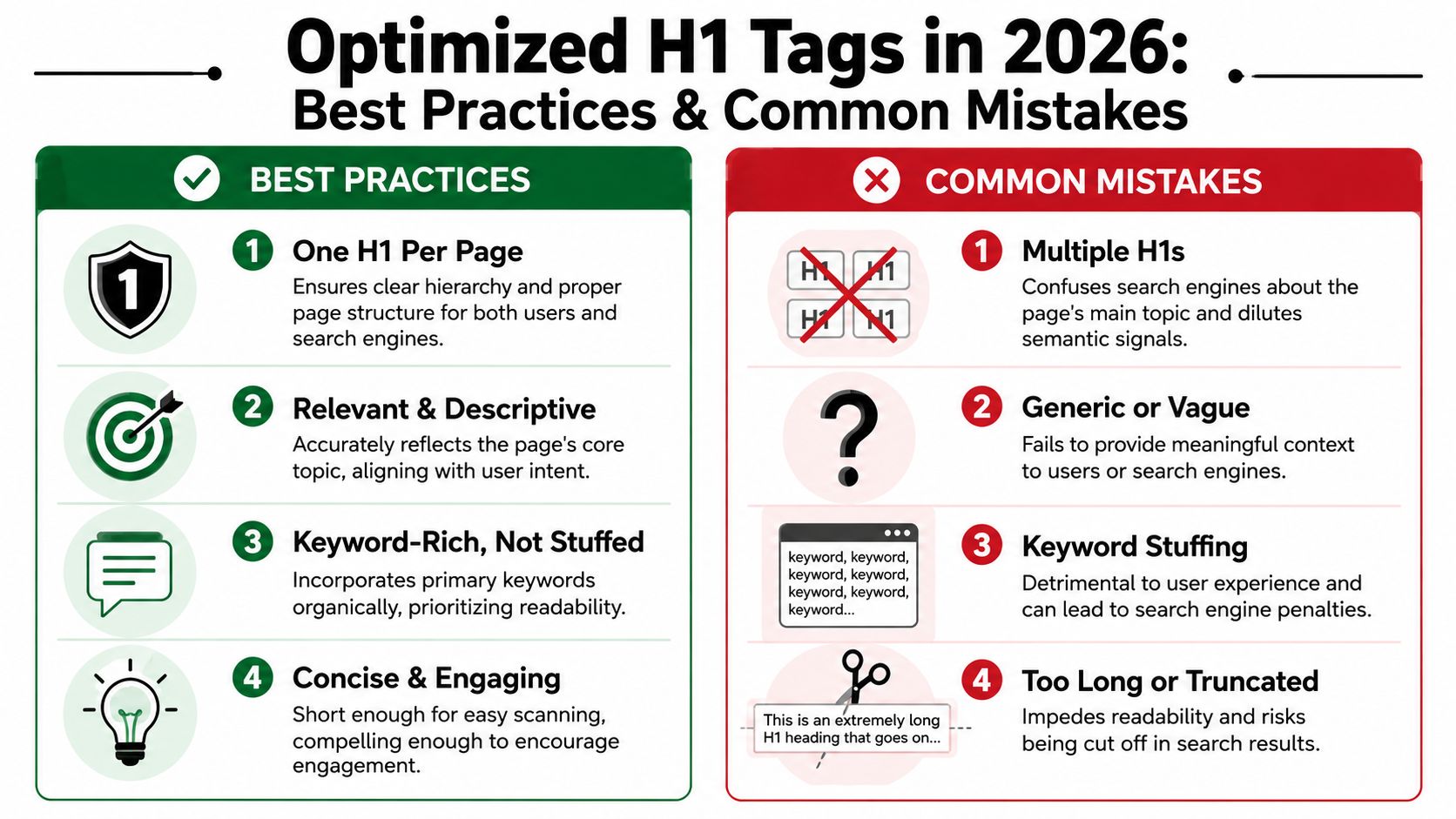
Most H1 advice is either too rigid or too loose. The practical middle ground is better. Use one clear H1 in most cases, write it in natural language, align it with the page title and topic, and make sure the section hierarchy underneath it is clean.
A useful data point supports that approach. A 2026 Rankability case study on H1 usage found that 93.5% of top-ranking pages used a single H1 tag, but it also found a negligible correlation of −0.0282 between rank and partial keyword match in the H1. That's the clearest summary of modern H1 tag SEO I've seen. Top pages usually use one H1, but keyword matching inside the H1 doesn't show meaningful ranking power on its own.
The modern H1 checklist
Use this as an editorial standard.
- Write for topic clarity: The H1 should tell a first-time visitor exactly what the page covers. If someone can't understand the subject from the heading alone, rewrite it.
- Keep it aligned with the title tag: It doesn't have to be identical, but it should describe the same topic in closely related language.
- Include the primary keyword naturally: If the main phrase fits, use it. If exact-match wording sounds forced, choose the clearer version.
- Use one H1 on most pages: HTML5 allows more flexibility, but one main heading still creates the cleanest structure in most CMS environments.
- Make the supporting hierarchy logical: H2s should break the main topic into major sections, and H3s should sit under the relevant H2s only.
For teams managing enterprise CMS environments, implementation often matters as much as copy. If you work in Sitecore or SharePoint, Kogifi on Sitecore and SharePoint SEO is a practical reference because these platforms often create heading issues through templates rather than through editorial intent.
A simple implementation example
Here's the pattern you want:
<h1>H1 Tag SEO Guide for Search in 2026</h1>
<h2>Why H1s Still Matter</h2>
<h2>How to Write a Strong H1</h2>
<h3>When to Use the Primary Keyword</h3>
<h2>Common Mistakes</h2>
And here's the pattern you want to avoid:
<h1>SEO</h1>
<h3>Tips</h3>
<h2>H1 Tag SEO H1 Tags Best SEO H1</h2>
The first example creates a usable outline. The second creates confusion.
If you want a good editorial test, read the H1 and all H2s without reading the body copy. If the outline feels coherent, you're probably in good shape. That same principle also supports AI extraction, because readable structure makes the page easier to summarize accurately. This is one reason teams focused on AI visibility also care about readability levels that win GEO and AEO citations.
Don't chase perfect keyword symmetry. Chase clear topical alignment.
That's what works now.
Common H1 Tag Mistakes and How to Fix Them
Most H1 problems aren't conceptual. They're operational. A CMS strips the heading. A template outputs multiple H1s. A designer uses an H1 for a logo. A writer publishes a clever headline that says nothing.
The fix is usually straightforward if you look at the page like a structure problem, not just a copy problem. As noted by MarTech's H1 best practices overview, the highest-value pattern is keeping the H1 semantically aligned with the page's title and primary keyword while maintaining a clean H1 → H2 → H3 hierarchy so crawlers and accessibility tools can interpret the content properly.
H1 Tag Error Correction Guide
| Mistake | Why It's a Problem | How to Fix It |
|---|---|---|
| Missing H1 | The page has no clear top-level topic marker | Add one visible main heading that accurately describes the page |
| Multiple H1s from a theme or builder | The page may present several competing main topics | Keep one primary H1 and convert the others to H2 or styled text |
| Logo wrapped in H1 on every page | The site brand becomes the main heading instead of the actual page topic | Reserve the H1 for the page title, not the header logo |
| Vague heading such as “Welcome” or “Resources” | Users and crawlers get little context about the page's purpose | Replace it with a descriptive phrase tied to actual intent |
| Keyword-stuffed H1 | The heading reads unnaturally and weakens usability | Rewrite it in plain language and keep only the relevant phrasing |
| H1 misaligned with title tag | The page sends mixed signals about the main topic | Bring the title tag and H1 into close topical alignment |
| Heading levels skipped below the H1 | The outline becomes harder for assistive tools and crawlers to interpret | Use a logical order, starting with H2 for major sections |
| Hidden H1 used only for SEO | Users see one message while the markup signals another | Use a visible H1 that matches the page's true topic |
A quick review standard
When reviewing pages, ask three questions:
- Can a human identify the topic instantly
- Does the heading outline make sense in order
- Does the page promise match the page content
If the answer to any of those is no, the H1 probably needs work.
H1 Tags and the Future of AI Search
The next phase of H1 tag SEO isn't about ranking formulas. It's about interpretation quality.
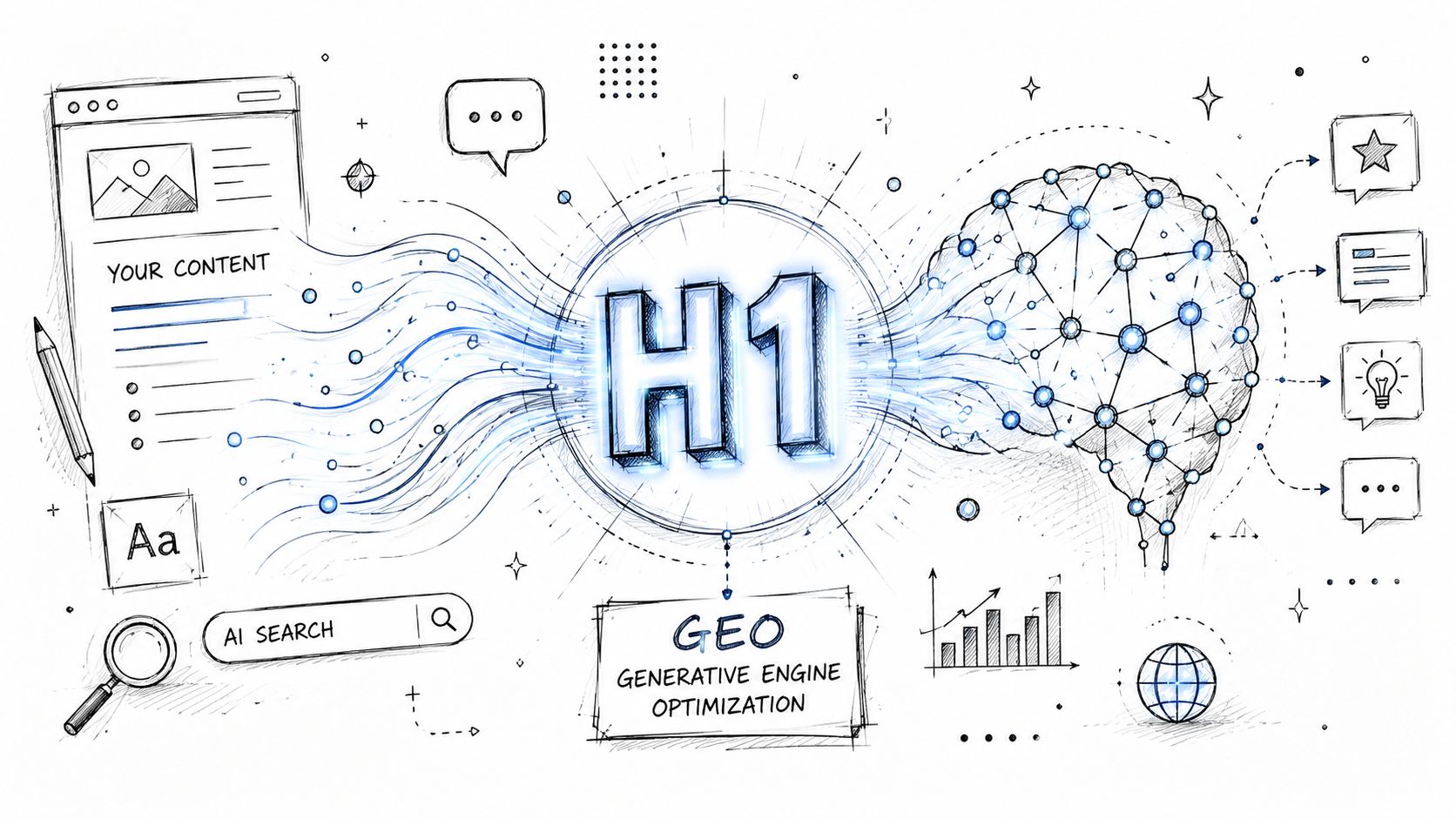
AI search systems don't read pages the way a person does. They parse, compress, and assemble meaning from multiple signals. In that process, the H1 functions like a high-priority label for what the document is trying to say. If the label is vague, bloated, or disconnected from the content below it, the system has to infer more. That increases the risk of a weak summary or a bad citation context.
Why AI systems care about H1 clarity
The old “exact match everything” advice breaks down. The more useful question is whether your H1 makes the page easy to summarize accurately.
According to Mangools' discussion of H1 SEO, guidance is inconsistent on whether the H1 still needs exact-match keyword optimization. Many pages rank well with more natural, user-first H1s, which suggests that over-optimizing the H1 is less valuable than aligning it with the overall page structure for AI and user clarity.
That matches what content teams are seeing in practice. Cleanly written headings tend to support cleaner extraction. Messy headings force models to reconcile conflicting signals from titles, intros, subheads, and body copy.
If a model has to guess what your page is about, your H1 has already failed its first job.
What to optimize for now
For AI search and generative engine optimization, a strong H1 should do four things:
- Name the subject plainly: Use the language your audience expects, not brand-speak.
- Match the content underneath: Don't promise a guide if the page is a product page, and don't label a comparison page like a tutorial.
- Support likely summaries: If an AI system had to describe your page in one sentence, the H1 should help it get that sentence right.
- Reduce ambiguity across templates: This is especially important in CMS-heavy sites and WordPress builds where theme issues can damage semantic structure. For teams cleaning that up, this guide to avoiding WordPress SEO errors is useful because many heading problems start in templates, not in copy.
AI visibility work also benefits from understanding how content gets interpreted and reused by generative systems more broadly. This article on search engine optimization using AI is a good next read if your team is connecting on-page SEO to GEO strategy.
The H1 hasn't become more powerful because of keyword weighting. It has become more strategic because more systems now depend on fast, reliable topic extraction.
Frequently Asked Questions About H1 Tags
What's the difference between a title tag and an H1
The title tag is the page title that typically appears in search results and browser tabs. The H1 appears on the page itself as the main visible heading. They should usually be closely aligned, but they don't have to be identical word for word.
Should you use emojis or special characters in an H1
Usually, no. A few brands can make it work, but most pages benefit from plain language. Special characters often make headings look less professional and can distract from the core topic signal.
What's the fastest way to audit H1 tags across a site
Use a crawler such as Screaming Frog to export heading data at scale, then spot-check key templates in the live browser. Also inspect the rendered HTML, because page builders and JavaScript can create heading problems that aren't obvious in the editor.
Spotlight Group LLC helps brands understand and improve how they appear across AI search platforms. If your team wants to see where models mention your brand, which prompts trigger those mentions, and what content earns citations, Spotlight Group LLC is built for that workflow.

Michael Hermon
Before Spotlight, Michael led Innovation and AI at monday.com after exiting his previous startup. He learned to code at 13 at MIT and later attended Columbia’s MBA program.
https://linkedin.com/in/michaelhermon